

In this article, I will analyze the reasons behind failed transactions on the Solana blockchain, delving into how the issues can be solved, as well as the possible solutions on a step-by-step basis.
A transaction can fail because of a congested network, there not being enough SOL in the user’s wallet, or an erroneous destination address.
By knowing the reasons and employing the right solutions, you can effectively troubleshoot and resolve issues, gain access to your funds, and complete transactions seamlessly on the Solana blockchain.
About Solana Transactions
Transactions on Solana occur when value, data, or digital assets are transferred on to the one of the fastest, most scalable blockchain networks. These transactions could be sending SOL,
Solana’s native cryptocurrency, smart contracts, or interacting decentralized applications and dApps or NFTs. Transactions are started from a wallet and signed and sealed with the private keys and are then sent to validators of the Solana network.

For both high-speed and low-cost transactions, Solana combines Proof of History and Proof of Stake. Transactions are confirmed as quickly as a few seconds, and each has a unique signature and registered gas fees, paid in SOL.
You can check on Solscan or Solana Explorer. Network congestion, incorrect addresses or insufficient funds causing failed or pending transactions means poor management becoming the single most important element.
How to Fix Failed Solana Transactions
Example: Solana Transaction Failure Solution
Example Transaction: Sending 1 SOL from your Phantom wallet to a friend. Phantom wallet transaction failed.
Step 1: Examine the Transaction Status
- Open wallet (Phantom, etc.).
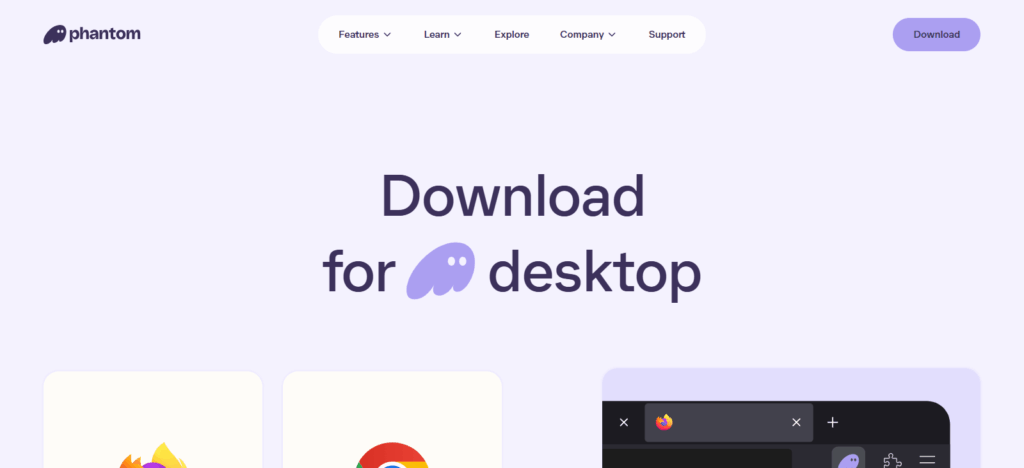
- Transaction signature (TxID) of failed transaction.
- Visit Solana blockchain explorer Solscan or Solana Explorer.
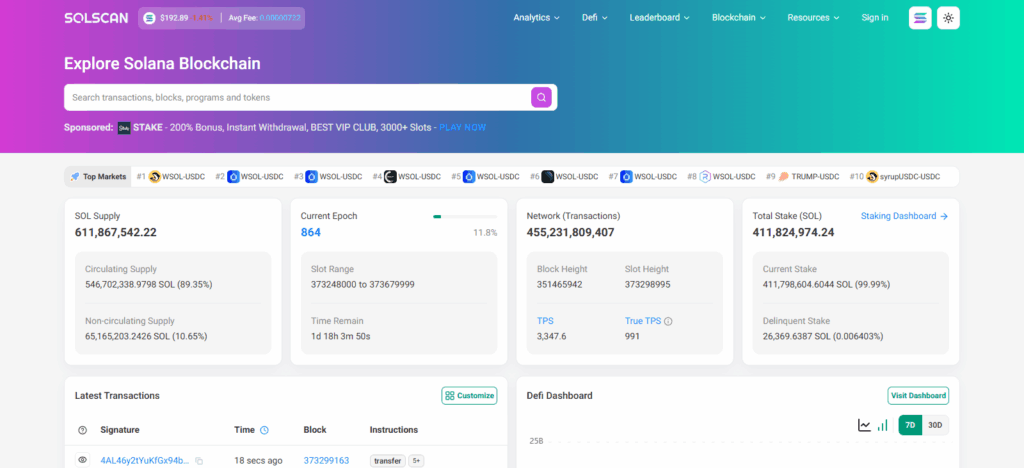
- Paste TxID to check transaction status.
- If “Failed” or “Error”. Proceed to next step.
Step 2: Identify Cause
- Check error message. Common reasons:
- SOL available for fees
- Overloaded network
- Incorrect or Unsupported address
Step 3: SOL for Fees
- Check your wallet.
- Ensure you have more SOL (typically 0.001–0.01 SOL) to cover transaction costs.
- Add more SOL to your wallet if needed.
Step 4: Transaction Retry
- Open wallet, input recipient address again.
- Input amount to send.
- Confirm transaction.
- Wait for blockchain transaction confirmation.
Step 5: Switch to a Different RPC Node (Optional)
- Go to your wallet to find the RPC/Network settings.
- Change to another RPC server (for instance, switch over from the default option to a public node).
- From the new RPC, attempt the transaction again.
Step 6: Confirm the Transaction Was Successful
- Grab the new transaction signature.
- Use Solscan or Solana Explorer to look it up.
- Look for the transaction to be marked as “Confirmed”.
Why use Fix Failed Solana Transactions
Recover Funds: Avoid losing SOL on transactions that have either failed or are stuck in limbo.
Ensure Transaction Completion: Confirms that transfers to wallets, purchases on DeFi platforms, or NFTs will be guaranteed.
Avoid Duplicate Transactions: Decreased chance of accidentally resending funds by addressing failed transactions.
Maintain Network Efficiency: The efficiency of your wallet communication with the Solana Network is improved.
Prevent Smart Contract Errors: Ensures that you successfully engage with DeFi smart contracts as well as NFT marketplaces.
Save Time and Stress: The longer you wait, the more frustration is inevitable.
Improve Wallet Management: Fixing failures teaches you more about your wallet and its tools, as well as the blockchain’s behavior.
Benefits Of Fix Failed Solana Transactions
Secure Your Funds: Ensures your SOL or assets are not lost due to failed transfers.
Successful Transfers: Ensures payments, NFT purchases, or DeFi interaction requests get completed.
Prevents Duplicate Payments: Minimizes the chances of sending the same transaction more than once.
Saves Time: Quickly resolving failures prevents longer delays and multiple attempts.
Reduces Frustration: Stressed caused by pending or stuck transactions is alleviated.
Improves Wallet Management: Facilitates the understanding of wallet operations to manage them better.
Maintains Network Efficiency: Smoother interaction with the Solana blockchain is achieved by clearing failed transactions.
Common Causes of Failed Solana Transactions
Insufficient SOL for Fees
Not enough balance to cover transaction fees.
Network Congestion
High traffic on the Solana blockchain can delay or fail transactions.
Incorrect Wallet Address
Wrong or unsupported addresses when sending SOL or tokens.
Expired or Stuck Transactions –
Transactions stuck pending for too long can fail.
Smart Contract Errors
Failed interactions when using DeFi protocols or NFTs due to issues with smart contracts.
Outdated Wallet or App
Using an old version of a wallet can cause errors when performing transactions.
Low Gas or Transaction Limits
Transaction failure is also due to improper settings on the transaction.
Pros & Cons
| Pros | Cons |
|---|---|
| Secure Your Funds: Prevents loss of SOL or tokens. | Time-Consuming: Some transactions may require troubleshooting. |
| Ensures Successful Transfers: Payments, NFT purchases, and DeFi interactions complete. | Technical Knowledge Needed: Beginners may find wallet settings or RPC changes confusing. |
| Prevents Duplicate Payments: Reduces risk of sending twice. | Dependent on Network Status: Network congestion can still cause delays even after fixing. |
| Saves Time & Reduces Stress: Quick resolution avoids frustration. | Limited Control Over External Contracts: Smart contract errors may require platform support. |
| Improves Wallet Management: Helps users understand transaction processes better. | Possible Fees: Retrying transactions may incur small network fees. |
Preventive Measures for Future Transactions
To minimize future occurrences of failed transactions on Solana blockchain, several steps can be taken. Ensuring your wallet always has enough SOL balance to cover transaction fees is critical. Also, do not send an amount that is greater than your balance.
Keeping your wallet or application to the latest version will reduce the chances of running into avoidable glitches. Before you perform any transfer, quadruple check that you have the recipient’s wallet address since this is one of the common human errors.
Also, check that the address is compatible with the token or NFT you are sending. You can reduce the chances of stuck or failed transactions by keeping an eye on the network status and avoiding highly congested periods.
For DeFi or NFT transactions, always check that the relevant smart contracts are compatible and active. Following the guidelines above will result in your transactions on the Solana blockchain being completed faster and in a more secure manner.
Conclusion
To protect your money and ensure transfers and your blockchain interactions go smoothly, it’s important to understand how to fix failed Solana transactions.
Knowing the main reasons behind them– too low fees, crowded networks, and wrong addresses– and using tailor-made solutions like resubmitting transactions and changing RPC nodes or your wallet works best, allows users to deal with failures in no time.
Active steps to prevent them in the first place will guarantee successful transactions in the future and improve your experience with Solana by saving time and minimizing frustration.
FAQ
Why did my Solana transaction fail?
Common reasons include insufficient SOL for fees, network congestion, incorrect wallet addresses, expired transactions, or smart contract errors.
How can I check if a transaction failed?
Use the transaction signature (TxID) on Solana explorers like Solscan or Solana Explorer to see the status.
Can I recover SOL from a failed transaction?
Yes, most failed transactions do not deduct funds. Ensure the transaction is marked failed and retry if needed.
What should I do if a transaction is stuck?
Try switching RPC nodes, updating your wallet, or retrying the transaction after confirming network status.